Can ChatGPT analyze videos?
Partly, and the part it misses is the part creators care about most. ChatGPT now takes video files as attachments, but OpenAI’s own help page warns it may not analyze the whole video or read the audio correctly. Paste a Shorts link instead and you get a summary built on captions and rough timings, not a shot list. Claude won’t take a video file in chat at all.
Every workaround turns the video into text or a handful of still frames first. What falls out in that conversion is exactly what a hook runs on: where the cuts land, how fast the pacing moves, and what’s on screen in the first 3 seconds.
Below: what actually happens when you upload, what ChatGPT and a shot-by-shot analyzer each made of the same real Short, how to hand that breakdown to your AI, and where Claude and Gemini stand.
Yes. On web and mobile, tap +, choose Add photos & files, and pick the video. If the Photos picker won’t let you select it, attach it through Files instead. Free plans can do this too, and video counts toward your file-upload limit.
That’s the whole answer to “how to upload video to ChatGPT.” The harder question is what happens after the upload finishes.
ChatGPT doesn’t play the file the way you do. It uses tools to pull pieces out of it, usually still frames plus whatever speech it can transcribe, then reasons over those pieces. OpenAI is upfront that this can be incomplete. In practice, three things go missing for short-form creators:
Links are a separate problem. Give ChatGPT a TikTok, Reel or Short URL and it works from whatever it can reach, mostly captions and a few visuals. You’ll see exactly what that looks like in the test below.
Even the upload button isn’t always there. One creator who uses ChatGPT to review the videos she makes for her mom’s small business found it gone overnight:
“Yesterday though, suddenly the capability of uploading a video into the system is suddenly gone.” — u/rebeccasaidit, r/ChatGPT
She had always picked videos from Photos. If that option disappears for you, try attaching the file through Files instead; OpenAI notes that video upload varies by platform and upload method.
We tested with a 58-second YouTube Short: “I love Korea but” by Doobydobap. We pasted the link into ChatGPT and asked: “Please help me break down the hook of this video.”
The video and every frame shown in this post belong to Doobydobap. Watch the full Short on her YouTube channel.

ChatGPT came back with a tidy five-row table, and it got the big idea right. The opening line, “Should I renew my lease?”, turns a housing question into a bigger one: stay in the life she’s built, or move on. As a summary, that’s useful.
Then look at how it got there. ChatGPT said it worked from the captions and the opening visuals, and it shows:
That’s the ceiling of working from captions and a few sampled frames. ChatGPT can tell you what a video is about. It can’t tell you how it was built.
A pasted transcript hits the same wall. It gives you the script, which is useful on its own (our guide to getting an instagram reels transcript covers the free ways), but it doesn’t carry a single cut.
We ran the same link through Hookova’s Hook Analyzer. It took about two minutes: download, shot detection, speech transcription, then a storyboard and a report.
[SCREENSHOT : Hookova List view showing ONE shot only (0–1.5s row with its single frame); crop or blur every other thumbnail and the large preview.
Caption: Frame from Doobydobap’s “I love Korea but” (https://www.youtube.com/shorts/8XHcYgsJJjs)\/)]
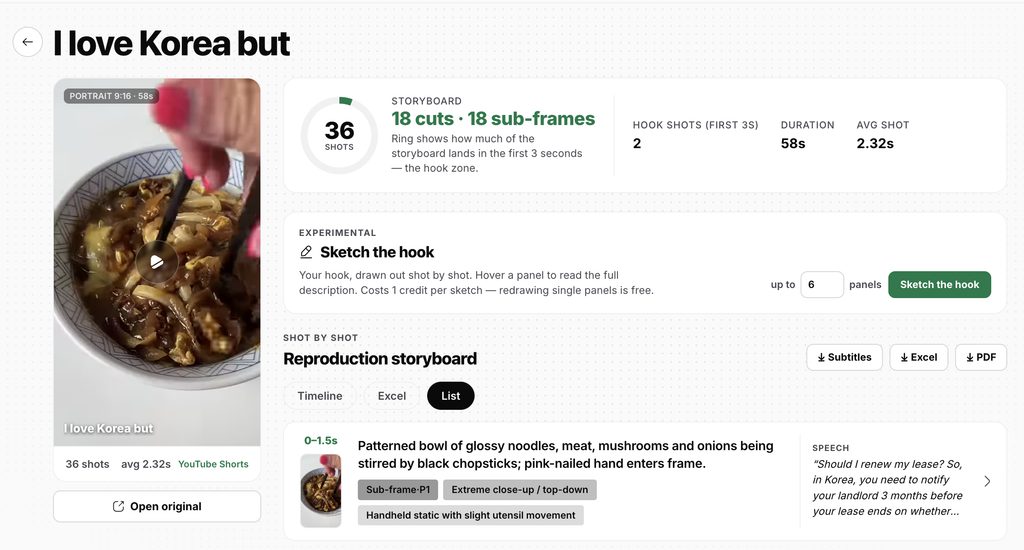
The difference starts at second zero:
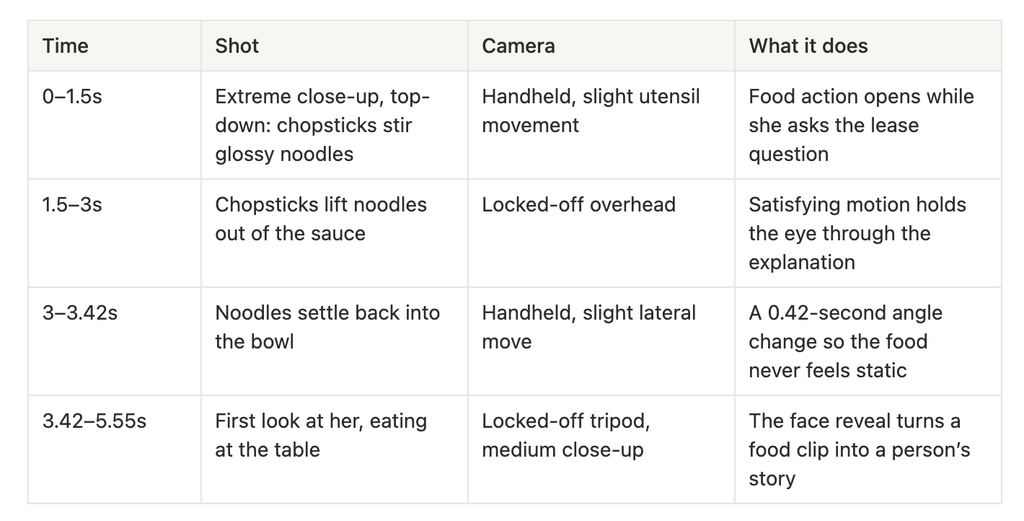
Across the whole video that’s 36 shots, averaging 2.32 seconds each. Every shot comes with its frame, timestamps, shot size, camera movement, on-screen text, the line spoken over it, its purpose and the hook or retention technique it uses.
Now ChatGPT’s “around five seconds in, she’s eating” makes sense, with the detail that matters: her face doesn’t appear until 3.42s, after three fast food cuts. Food first, face only once you’re watching. That rhythm is the hook, and it’s invisible in a transcript.
The breakdown is also built to leave the browser. Export it as subtitles (.srt), an Excel sheet with a screenshot per shot, or a PDF storyboard with one page per shot. Hand the PDF to an editor, drop the sheet in your team’s drive, or keep it as the reference for your next shoot.
One honest limit: the analysis transcribes speech but doesn’t analyze the music or sound effects, and it handles short-form clips up to 3 minutes.
Once you can see why a hook works, writing your own gets easier. Our tiktok hook generator post has fill-in-the-blank openers you can test the same way.
All of that can go straight to your AI, too. MCP (Model Context Protocol) is a standard way for an AI assistant to call outside tools. Instead of you feeding the model screenshots and text, the model asks a tool for structured data and gets it back directly.
That matters for three reasons:
Setup is short. In Hookova, click Connect to My AI, copy the prompt, and paste it into Claude Code, Cursor or Codex. We won’t repeat every step here; the full walkthrough is in our MCP server guide.
The same connection gives your AI the rest of your toolkit. It can pick tracks from 1,442 royalty-free songs and 982 sound effects based on a description of your video, and it can search any reference video you’ve added to Saves, whichever platform it came from.
Not directly. In the Claude app you can upload images and documents, but an MP4 gets rejected as an unsupported file type. Claude reads screenshots well and handles long transcripts well, so the same two workarounds apply, along with the same blind spots: no cuts, no pacing, no feel for the first 3 seconds.
Where Claude gets interesting is Claude Code. It can call MCP tools, which means it can read a full shot-by-shot breakdown from Hookova without you uploading anything. For a lot of creators, that’s why “can Claude analyze videos” now has a better answer than “can ChatGPT analyze videos”: not because the model sees more, but because it’s easier to hand it the right data.
From Reddit — [OPTIONAL PLACEHOLDER: a verified quote from r/ClaudeAI about Claude and video, under 25 words] — u/[username], r/ClaudeAI
Gemini is the one major assistant that accepts video natively, including YouTube links, so it’s the strongest option if you just want a summary. For hook work it still gives you a description, not a reusable shot breakdown you can save, compare and build on.
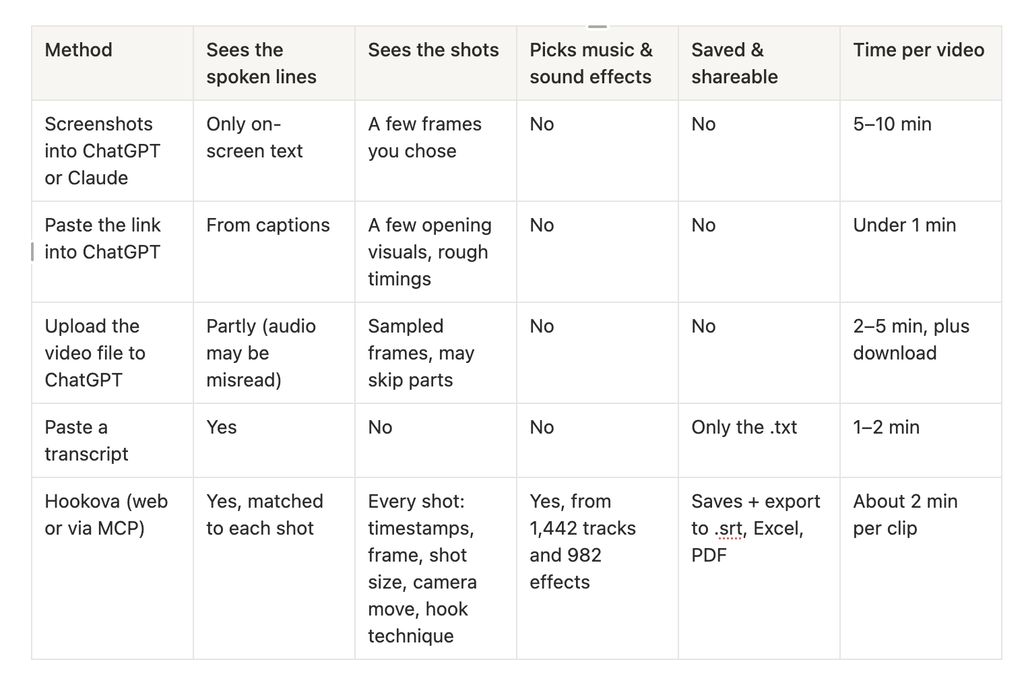
If you only need the words, a transcript is enough, and a free tiktok transcript generator gets you one in seconds. If you’re trying to figure out why a video holds people, the AI needs the shots.
Can ChatGPT watch YouTube videos from a link?
Not the way you do. In our test with a Shorts link, it worked from the captions and a few opening visuals, with timings rounded to a few seconds and no shot list.
Can ChatGPT analyze a TikTok?
It can summarize one, from a link or an uploaded file. Because it works from captions and sampled frames, the cuts and exact timings get lost.
Is there a free way to get a video’s text into ChatGPT?
Yes. Pull the transcript with a free tool, download the .txt and paste it in. That covers what was said, not what was shown.
Does Hookova analyze the audio?
No. It reads the visuals and the spoken lines. It doesn’t detect music type or sound effects in the original video.
ChatGPT and Claude are good at reasoning about a video once they have the right inputs. The problem has never been the model; it’s what you hand it. Connect Hookova and your AI gets the shot breakdown, the lines and the hook read in one step.
Set up the Hookova MCP server →
By Hookova Team
 Hookova