The fastest way to get an Instagram Reels transcript is to paste the Reel’s link into a transcript tool, but there are free ways too. Instagram itself won’t help much: it can show captions on a Reel, but there’s no transcript panel and no way to copy them out of the app.
So you have three options:
Here’s how each one works, and when it’s worth the effort.
Instagram can generate captions for a Reel automatically. Creators switch them on when they post (under Advanced settings) or later from the Reel’s three-dot menu, and they can edit the text before or after posting.
As a viewer, you’ll see those captions only if the creator turned them on and you have captions enabled. When they’re there, you can pause the Reel and read along line by line.
The catch: you can read them, but you can’t copy them. There’s no “show transcript” button, no text panel and no export. Some creators also burn captions into the video with the Captions sticker, which makes them part of the picture, so they’re even harder to grab.
Good for: pulling one quote or checking a single line. Not good for: anything longer than a few sentences. Typing out a 60-second Reel by hand takes 5 to 10 minutes, and it’s easy to miss words when captions flash by.
If you can get the video file onto your phone or computer, any transcription app can turn it into text.
This is the route most people already know, and it’s reliable when the download button is there. The friction is everything around it: saving the file, uploading it somewhere else, waiting, then cleaning up. Video editors like Descript also do far more than you need if you only want the words. If that’s you, our roundup of descript alternative options for transcript-only work will save you a subscription.
Good for: your own Reels, or creators who allow downloads. Not good for: Reels with downloads switched off, or when you’re doing this for ten Reels in a row.
You’re not the only one stuck at that download step. One creator asked on Reddit:
“I’ve found many tools, but they all require uploading a downloaded video. I need help transcribing reels by simply adding the reel’s link.” — u/macrogger, r/transcribe
That’s exactly the gap the next method fills.
Both free methods work. They also eat your time: pausing and retyping, or saving, uploading, waiting and cleaning up. Do that for ten Reels a week and an hour is gone that you could have spent actually making something.
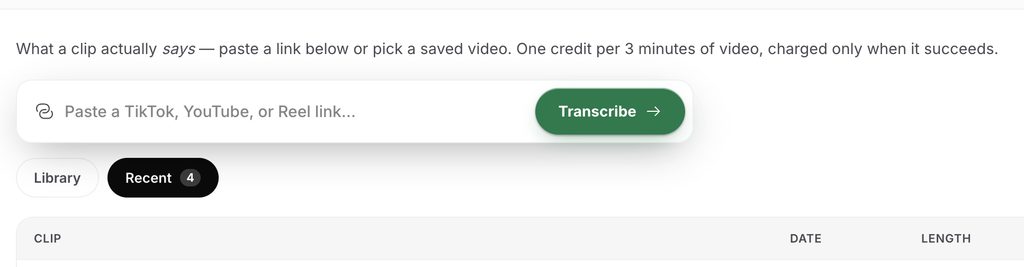
If you’d rather not, Hookova turns a Reel link into a full transcript in about a minute:
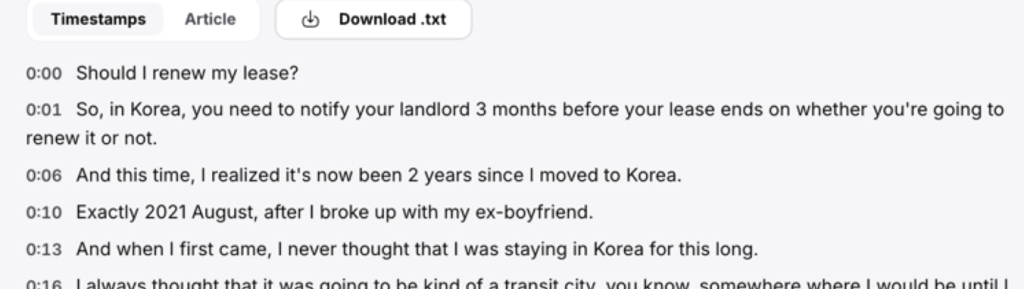
What you get for it:
Time is money. Let the tool do the typing, and spend that hour on the part only you can do: writing and shooting your next Reel.
One honest limit: you get the words, not the visuals or the music. To see how a Reel was cut shot by shot, use the Hook Analyzer instead.
Get a Reel transcript in a minute →
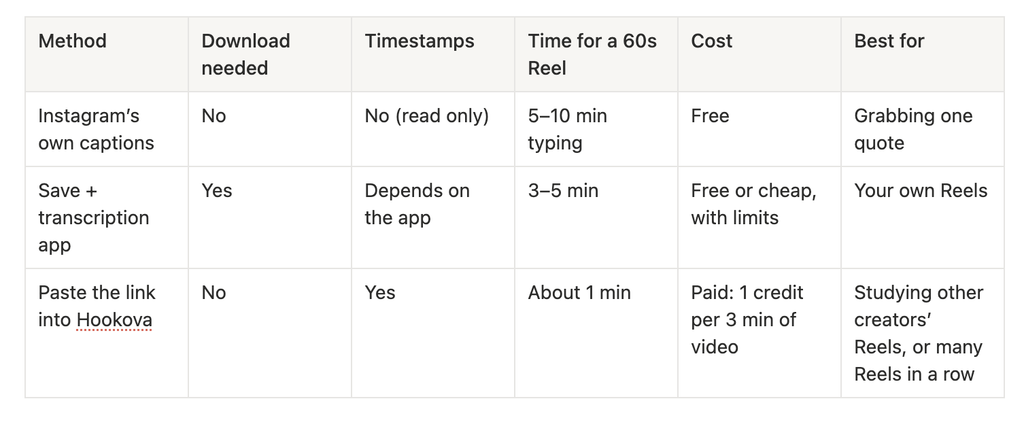
If you only need a line or two, Instagram’s captions are fine. If you’re collecting scripts to study how other creators open their Reels every week, the minutes you save with Hookova add up fast.
“Instagram script extractor,” “Instagram to text,” “transcribe Instagram video”: people search all of these, and they mean the same job. You give it a Reel, it gives you back the words that were spoken.
A good one does three things:
What it won’t give you is the visuals. A script extractor hears what was said, not what was shown. If you want to know how a Reel was cut, shot by shot, that’s a different tool. We tested the difference in can ChatGPT analyze videos, and you can browse real openers broken down in our hook examples guide.
On YouTube, many videos have a built-in Show transcript button. Instagram has nothing like that for viewers. Captions, when they exist, stay locked inside the player.
That’s why Reels lean on outside tools more than other platforms do. Two other differences matter:
If you also make TikToks, the caption side works differently there. Our tiktok caption generator guide covers TikTok’s auto captions and post captions. And if you care about what’s playing under the words, see our reels music guide.
Can you see a transcript of an Instagram Reel in the app? No. Instagram can show captions on a Reel if the creator turned them on, but there’s no transcript view and the captions can’t be copied.
How do I turn an Instagram video into text for free?
For a line or two, read the captions and type them out. For a full script, download the Reel if it allows it and run it through a free transcriber. If you’d rather not spend the time, a paid tool like Hookova does it from the link in about a minute.
Can I transcribe a Reel without downloading it?
Yes. Copy the Reel’s link and paste it into a transcript tool that supports Instagram links. The tool fetches the video for you.
Does the transcript include timestamps?
It depends on the tool. Instagram’s captions don’t give you any. Hookova’s Timestamps view shows each line with its time, and the Article view drops them for easy reading.
Can I transcribe Reels from private accounts?
No. Link-based tools can only reach public Reels. For a private account’s Reel, you’d need the creator to share the file.
Stop pausing and typing. Paste a Reel link, get the full script with timestamps, and download it in one click.
Transcribe an Instagram Reel →
By Hookova Team
 Hookova