You checked a “trending audio this week” list, picked the one everyone’s using, laid it under your Reel, and posted. Two things happen with that routine. Either nothing — the number is the same as last week — or worse: the track is louder than you, and the point you were making is gone.
The lists aren’t wrong, but they answer the wrong question. They tell you which sound is climbing. They never say what a sound is doing in your video, and that’s the thing that decides whether it helps.
Sort any track by the job it’s doing, and the choice stops being a scroll through a chart.
It buys you into a trend. Every audio on Instagram has its own page listing the Reels that used it, and a trending sound wears a small rising arrow next to its name. Using it puts your video on a surface people are actively browsing — the same mechanism as a trending TikTok effect, and it expires the same way: the week the sound stops being interesting.
It sets the rhythm. A track with a clear beat tells you where to cut, and viewers feel cuts that land on the beat as right without knowing why. This is the job that survives after the trend dies, because it’s structural.
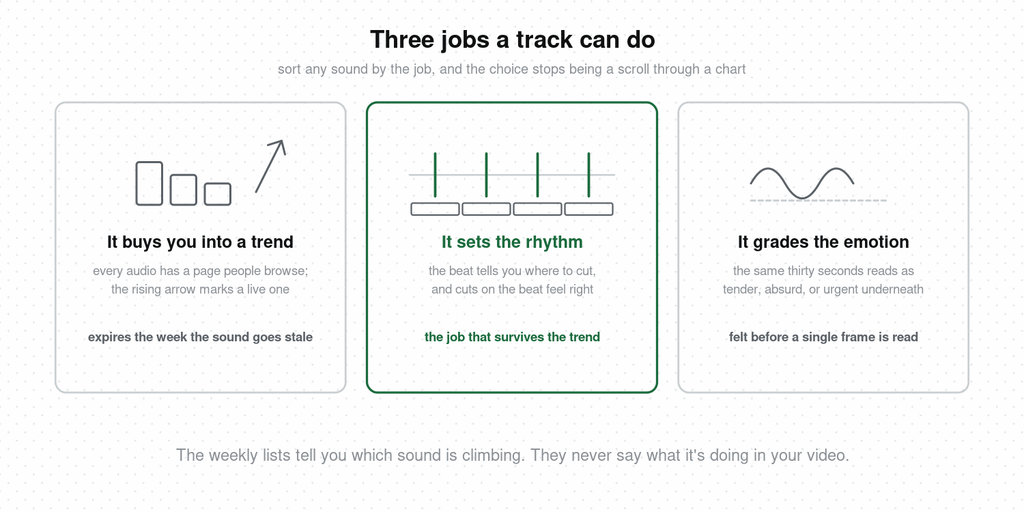
It grades the emotion. The same thirty seconds of footage reads as tender, absurd, or urgent depending on what’s underneath it. Music is the fastest tone decision you can make, and the one viewers register before they’ve processed a single frame.
If your Reel has a voice in it — you teaching, you selling, a customer talking — music is competing with the only thing that matters. Viewers can hold one audio stream at a time. A trending track at normal volume under a talking head means the words lose, and the words were the video — and a viewer who can’t follow the words leaves, which is the number that decides distribution.
There’s a second, quieter cost. Most people scroll with the sound off. A Reel built around a track — the joke is in the lyric, the reveal lands on the drop — plays as silence to that majority. Everything the music was carrying has to be carried again by text on screen, or it’s carried by nothing.
And one practical wall: business accounts can’t use most licensed popular music at all. If you’re posting from a shop or brand account, the trending track you found may simply not be available to you, and the royalty-free library is what you’re working with. Check in-app before you build around a sound.
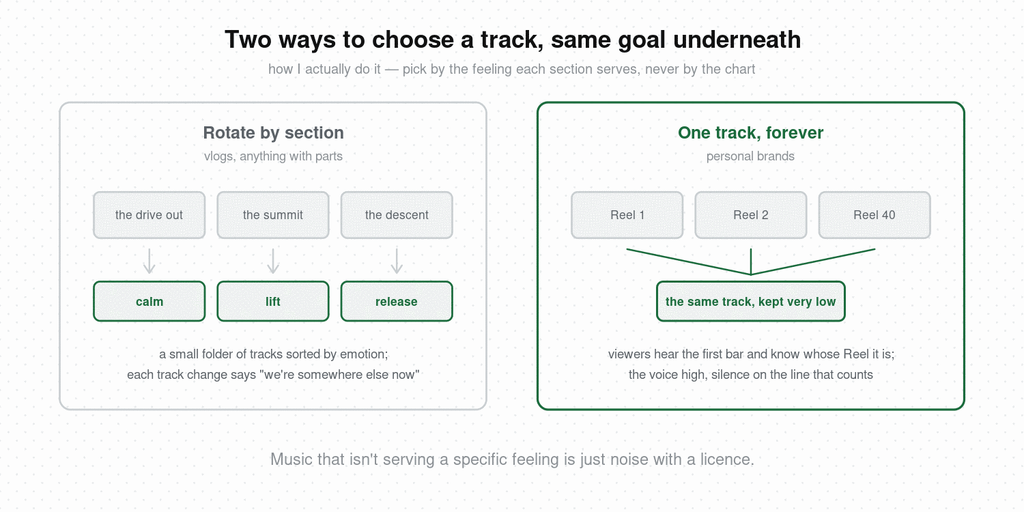
Here’s how I actually choose. I don’t start from a chart. I start from what each section of the video is trying to make someone feel, and I keep a small folder of tracks sorted by emotion — calm, lift, tension, release, a couple of others. When I edit a vlog, the music changes with the section: the drive out gets one track, the summit gets another, the descent gets a third. Each cut to a new track tells the viewer we’re somewhere else now, and it does that without a title card.
It sounds like more work than one trending sound laid end to end. Once the folder exists it’s less, and the result reads as a piece with a shape. Every element in a video — footage, sound, music — is an aid to what you’re expressing, and music that isn’t serving a specific feeling is just noise with a licence.
You’ve saved Reels where the music switched at exactly the right moment and the whole thing lifted. Hookova keeps those: install the extension, tap it once on any Reel, TikTok, or Short that stops you, and it’s filed. When you’re ready, analyze the one you want and see where the track changes, where the cuts fall against it, and what the text was doing while the sound did its job.
The rotation method is for vlogs with sections. If you’re building a personal brand, the opposite works just as well: pick one track and keep it, every video, until it becomes yours. Viewers hear the first bar and know whose Reel this is before your face arrives — a signature, the way a grade or a framing line can be.
The condition is volume discipline. That signature sits very low, the voice sits high, and on the line that matters the music drops out completely — a moment of silence handed to the voice alone. That gap is the loudest thing in the video. The goal underneath both methods is the same: catch the emotion, then amplify the one that deserves it, and let everything else get out of the way.
When you do want the trend route: scroll Reels and watch the bottom-left corner. A small rising arrow beside the audio name means it’s trending now. Tap the name for the audio page — how many Reels used it, where it started, a Save button. Saved sounds wait in your audio picker. That’s the whole mechanic; the weekly lists are other people doing this scroll a few days late.
If you do use a track with a strong pulse, commit. Line up your cuts with the beat — most editors show the waveform, and the peaks are your cut points. A video that cuts near the beat but not on it feels subtly off, the way a punchline that lands a few frames late feels off. Either lock to the rhythm or choose ambient music with no pulse to fight.
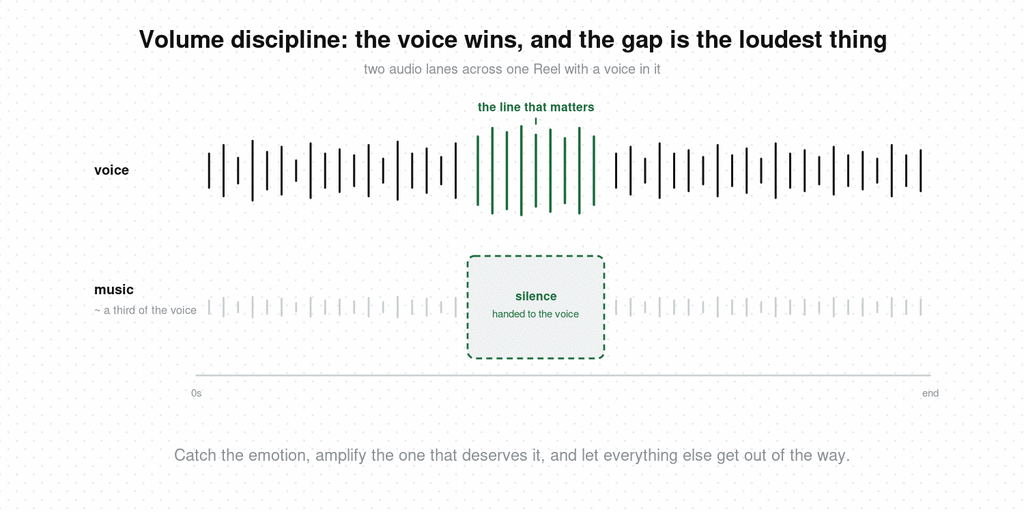
One more mechanical thing: keep the track under the voice at roughly a third of the voice’s level, and duck it further on the line that matters. The music should be something the viewer would notice if it stopped, and never something they notice while it plays.
Lifestyle and vlog. Music is doing most of the emotional work. Rotate by section and let the track change be your scene change — or, for a personal brand, one signature track kept low, with silence on the line that counts.
UGC and product. Voice wins. Ambient bed at low volume, no lyrics, no drop. If the brief demands a trending sound, put it under the first two seconds only, then bring the voice up.
Knowledge and education. Your words are the content. Either no music, or a single quiet loop with no pulse. A trending track under a lesson signals that the lesson is filler.
Local business. Check what your account type allows first. Then pick one track that sounds like the place — you’re building a room people recognize, and the same sound across twenty Reels does that faster than twenty different trends.
How do you find trending audio on Instagram?
Scroll Reels and look for the small rising-arrow icon next to the audio name at the bottom left — that marks a trending sound. Tap the name to open its audio page, which shows how many Reels have used it and where it started. Save it from that page to use later.
Can business accounts use trending audio on Reels?
Usually not the licensed popular songs. Business accounts are limited to a royalty-free library, so many trending tracks won’t appear as available. Creator accounts have wider access. Check the audio picker on your own account before planning a video around a sound.
Is original audio or trending audio better for Reels?
Trending audio can put a video on a browsable surface for a short window. Original audio — your voice, a sound you made — is what makes a video yours and what other creators can reuse, which spreads your name. For content with speech, original audio wins by default.
Does trending audio help Reels reach?
It can add a temporary distribution route via the audio page, but reach is decided mostly by completion and the first second. A trending sound on a video people don’t finish does nothing; a strong opening on original audio travels fine.
How do you save audio on Reels?
Tap the audio name at the bottom of any Reel to open its page, then tap Save. Saved sounds appear in your audio picker under a saved tab when you create a new Reel.
What’s the best music for Reels?
The track that matches what the section is trying to make someone feel, at a volume that stays under any voice. For talking or selling, a quiet ambient bed with no lyrics. For vlogs, a small set of tracks sorted by emotion that you rotate as the scene changes.
A track is one decision inside a first second that makes several at once — the frame, the line, the sound, and what the text is doing when the sound is off. Hookova lets you keep the Reels that got all of them right and analyze the ones you choose, second by second. For the full range of opening techniques it recognizes, see the video hooks guide.
 Hookova