Most vidIQ reviews are written off screenshots and a pricing page. I actually ran my work through it, and I’ve been shooting and posting video for about ten years, alongside running social accounts for other people.
One thing before we start: I build Hookova, a tool in a neighbouring space. I’ll flag exactly where that colours my view, and the praise below is real — some of what vidIQ does is the best version of that thing I’ve used.
Nothing exotic: I used it the way a working creator would. Topic research in a niche I’ve operated in for years, full script generation on several topics, the title and tag flow on real uploads, and the outlier tools to scan what was moving in the niche that week. I already knew what the crowd in that niche sounds like, which turned out to be the most useful part of the test — I could tell instantly whether the output was adding anything.
Smooth is the honest word. The whole product leans toward mid-length and long-form YouTube, and its best quality is how it moves you forward: the script and SEO flows work by asking you questions, and each answer feeds the next step. Topic, angle, outline, title, tags — you never sit in front of a blank box wondering what the tool wants from you. Plenty of products claim guided workflows; this one actually guides.
The research layer is strong in the same practical way. Outlier scores and views-per-hour flag videos over-performing in a niche while they’re still climbing, which tells you a topic has energy before the crowd confirms it.
Pricing, as of this writing. Free is the trial layer — around 150 AI credits a month, enough to feel the workflow out. Boost runs $19/month, or about $16.58/month billed annually. Max is $49/month, drops to $39/month on annual billing, and only comes annual. Check current numbers before you buy; these move.
A few mechanics that reviews tend to skip and that changed how I’d buy:
The credit system is the real limiter. Every AI feature draws from a monthly credit pool — around 150 on Free, 2,000 on Boost, 6,000 on Max. Script generation eats credits fast, so a daily-upload channel on Boost can hit the ceiling mid-month. Price the tier by your upload rate, and treat the free tier’s credits as a two-week test window.
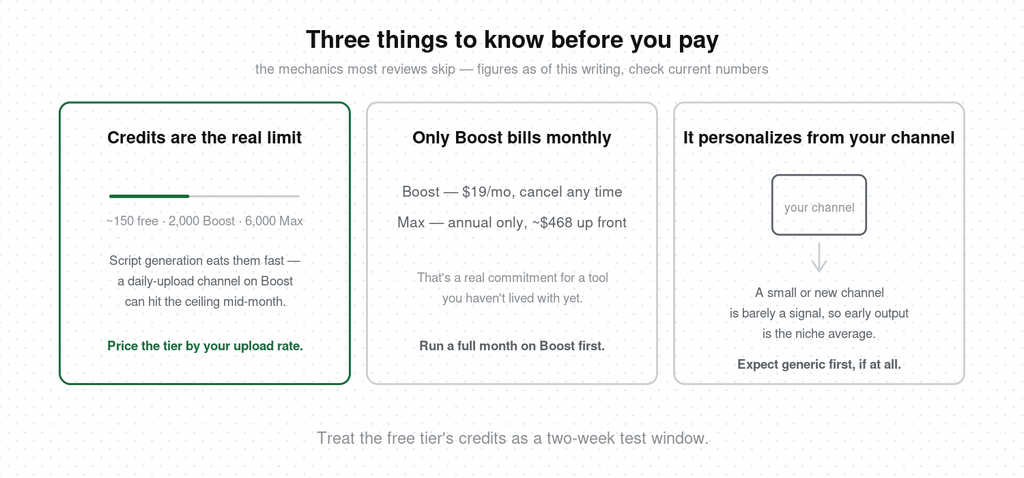
Only Boost bills monthly. Max is annual-only — roughly $468 up front. That’s a real commitment for a tool you haven’t lived with, so run a full month on Boost first even if Max’s model quality tempts you.
It wants your channel connected. The personalization runs through your own channel’s data. That’s also its limit, which the next section gets into.
I asked it to generate a script for a topic in a niche I know well. The structure came back clean and complete — and nearly identical to what most creators in that niche were already posting. Same beats, same framing, same conclusions. I ran it again on other topics. Same result.
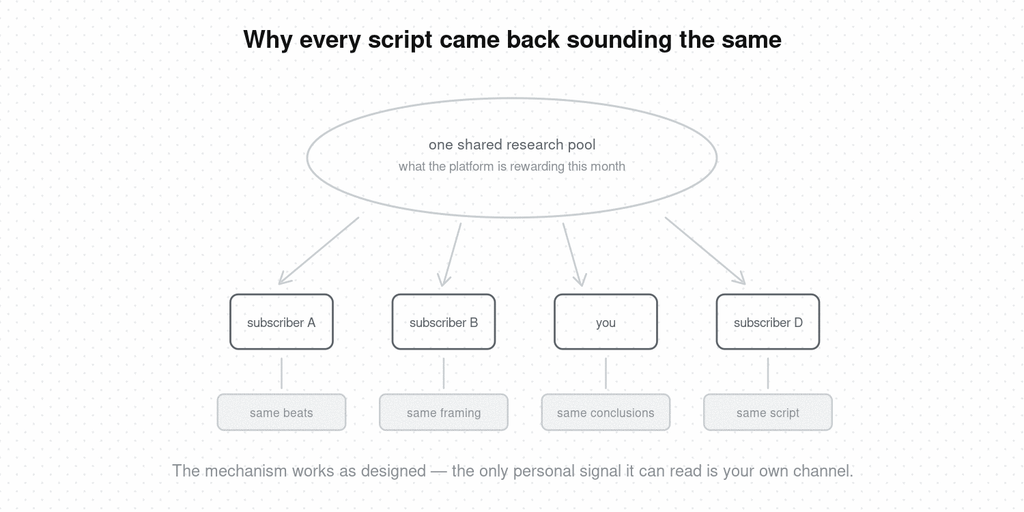
That’s the mechanism working exactly as built. The research pool is platform trend data — what’s currently being rewarded — and every subscriber draws from that same pool. The one personal input it can read is your own channel, which for a small or new channel is barely a signal. So the output converges: competently packaged, correctly optimized, and interchangeable with everyone else who typed the same topic into the same tool.
Whether that’s a dealbreaker depends entirely on what your channel runs on, which is what the verdict below sorts out.
Search-driven long-form channels: yes. Tutorials, reviews, how-tos — anywhere ranking for a query is the whole game. The keyword research, the guided packaging, the outlier alerts: this is the channel type the product is clearly built for, and for them the Boost tier earns its price.
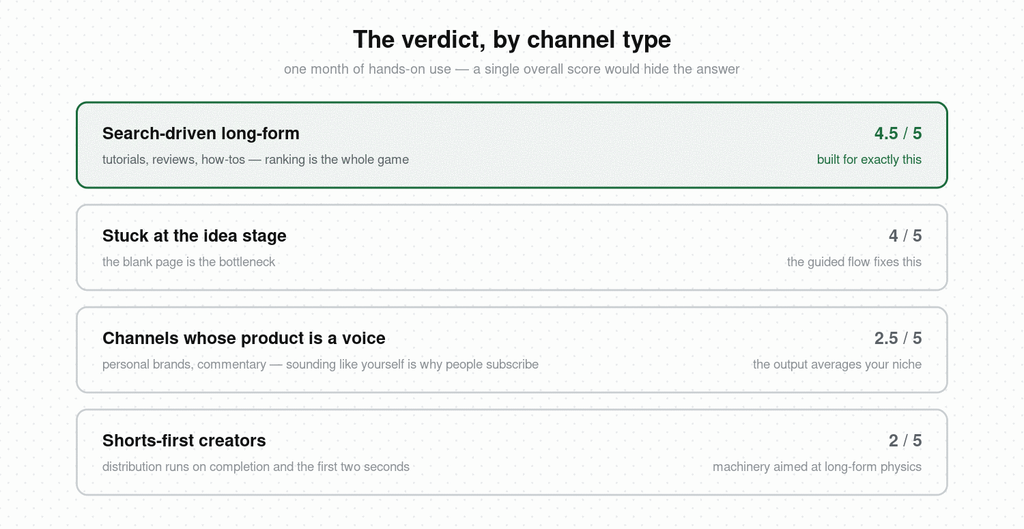
Channels stuck at the idea stage: probably. If your bottleneck is staring at a blank page, the question-driven flow genuinely fixes that, and fixing it is worth $19/month.
Channels whose product is a voice: careful. Personal brands, commentary, anything where sounding like yourself is why people subscribe. The tool averages your niche by design, and the more of its output you accept, the more average you sound. Here’s where my bias sits, so weigh it: I think what this kind of channel is missing is a library of its own references — the videos that stopped you, organized until the pattern in your own taste becomes visible. That’s the input no shared data pool has, and it’s the product I build.
Shorts-first creators: mostly no. The workflow is built around long-form discovery — search, titles, tags. Shorts distribution runs on completion and swipe behaviour, where the packaging matters far less than what the first line establishes. You’d be paying for machinery aimed at a different platform’s physics.
vidIQ is a well-made tool doing exactly what it says: it reads the platform and hands you the current playbook, efficiently. Four and a half stars for search-driven YouTube. Two and a half for anyone whose growth depends on being distinguishable — the flattening isn’t a flaw you can work around, it’s the shape of the input.
The month taught me a sharper way to put it: vidIQ answers “what is working.” It cannot answer “what do you see that others don’t” — and which of those questions is your bottleneck is the entire purchase decision.
Is vidIQ worth it?
For long-form YouTube channels built on search traffic, yes — the guided research and packaging workflow is efficient and well designed, and Boost at $19/month is fairly priced for it. For creators whose value is a distinctive voice, the trend-averaged output works against the thing they’re selling.
How much does vidIQ cost?
As of this writing: Free ($0, around 150 AI credits monthly), Boost at $19/month or about $16.58/month billed annually, and Max at $49/month, annual-only at $39/month. A coaching tier runs around $99/month. Prices change often, so verify before subscribing.
Is vidIQ free?
There’s a permanent free tier with limited AI credits that works as the trial — there’s no separate trial of the paid plans. It’s enough to test the guided workflow on a few videos before deciding.
Is vidIQ good for small channels?
The workflow helps small channels package videos correctly from day one. The limitation is personalization: its recommendations lean on your channel data, and a small channel barely has any, so early output is essentially the niche average.
Does vidIQ actually help you grow?
It reliably improves packaging — titles, tags, topic selection for search. Channels whose growth problem is coverage see real gains. Channels whose problem is standing out usually don’t, because every subscriber in the niche receives the same recommendations.
Should Shorts creators use vidIQ?
Its core machinery targets long-form search discovery. Shorts live on completion rate and the first two seconds, which is a different problem — reference libraries and hook analysis serve it more directly than keyword tools do.
If the review left you on the “distinguishable” side of the line, the tool for that is a different shape: Hookova saves any TikTok, Reel, or Short in one click and sorts it, lets you break down the ones you choose second by second, and turns the saves you drop into a project into content shaped for you — so your own taste becomes something you can read and build from. The full comparison is in the vidIQ alternative piece, and the opening techniques it recognizes are catalogued in the video hooks guide.
 Hookova