You’ve finished the cut. The timeline looks clean, the audio is level, the export settings are right. And you still have that feeling — you can’t tell whether this one lands or disappears.
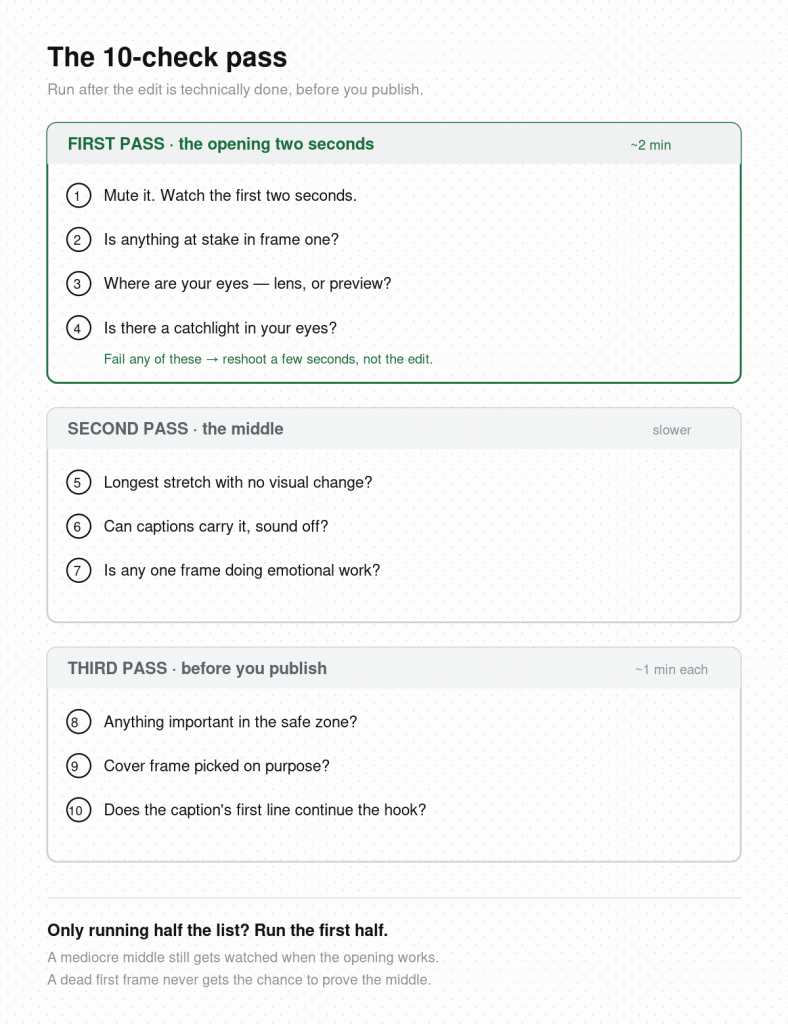
Your editor checked resolution, loudness, and codec. It has no opinion on whether a stranger watches past second two. That’s the gap this checklist covers: ten things to run through after the edit is technically done and before you hit publish.
Work through them in order. The first four decide whether the video gets an audience at all.
Most videos are decided here. Everything after this section only matters if this section passes.
1. Mute the video and watch the first two seconds. If you can’t tell what’s happening or why you’d care, the hook is carrying nothing visually. A large share of feed viewing happens sound-off, so a hook that only works with audio is a hook that only works for some viewers.
2. Check that something is at stake in frame one. Not a title card, not a logo, not you saying hello — a situation with tension in it. Scripted skits live or die on this, but it applies to a tutorial or a shop video just as much: the first frame should raise a question.
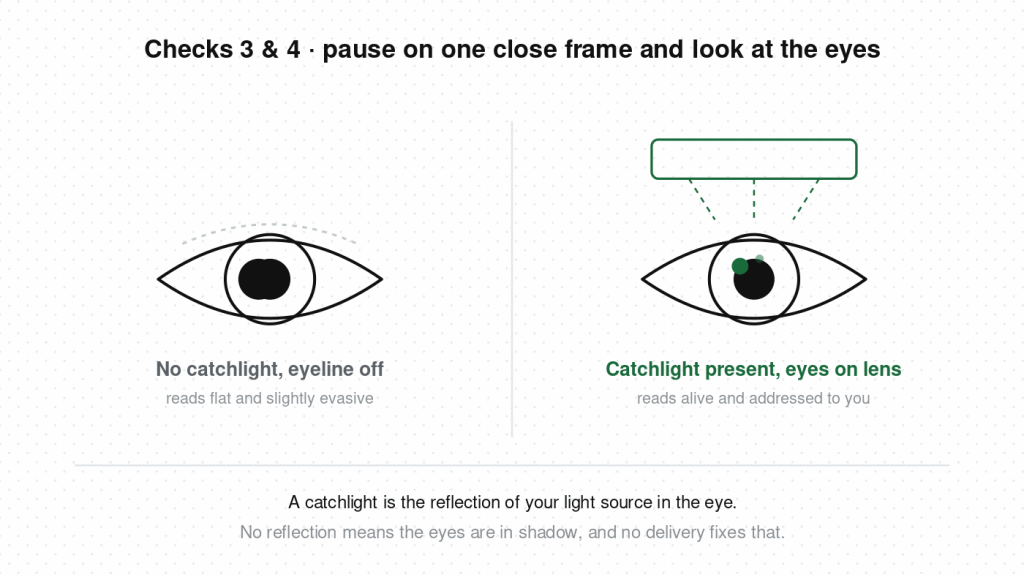
3. If you’re on camera, check where your eyes are. Watch your own first three seconds and find your eyeline. If it sat on the preview image of your own face, the drift is visible to viewers even when they can’t name it — looking into the lens is what separates a shot that addresses someone from one that’s merely pointed at them.
4. Look for the catchlight. Pause on a close frame and look at your eyes. If there’s no small reflection of your light source in them, your eyes are sitting in shadow and the shot reads flat no matter how good the delivery is. This is the fastest lighting fix on the list and the one people skip most.
If a video fails any of these four, the fix is a reshoot of a few seconds — not a re-edit. That’s a smaller job than it sounds, and it’s a better use of an hour than tightening cuts nobody will reach.
Once you start checking this way, you’ll notice the same four things in other people’s videos, usually a beat after you’ve already scrolled past. Hookova makes those keepable: save any TikTok, Reel, or Short in one click, analyze the one you choose, and it comes back broken down second by second with framing, camera, and hook notes attached, so the opening you admired becomes a reference you can hold your own footage against.
This section is about the people who did start watching. The goal is removing reasons to leave.
5. Find the longest stretch with no visual change. Scrub through and look for any span over about three seconds where the frame doesn’t move, cut, or change. Locked-off talking-head content is where this bites hardest — knowledge and education creators routinely lose viewers in the middle of a strong explanation because the picture went static while the information kept going. A cutaway, a push-in, or even a text overlay appearing is enough to reset attention.
6. Read your captions with the sound off. The question is not whether captions exist. It’s whether someone can follow the whole video from the captions alone, at scrolling speed. Auto-captions transcribe accurately and break lines badly — three words on one line, eleven on the next, punctuation missing where a pause belongs. Long unbroken blocks are as bad as no captions at all.
7. Check whether any single frame is doing emotional work. A tilted frame, a held reaction shot, a cut landing on a beat — one deliberate visual choice that marks which moment matters. Videos that pass every technical check and still feel flat are almost always missing this. They’re clean and uninflected, which reads to a viewer as competent and forgettable.
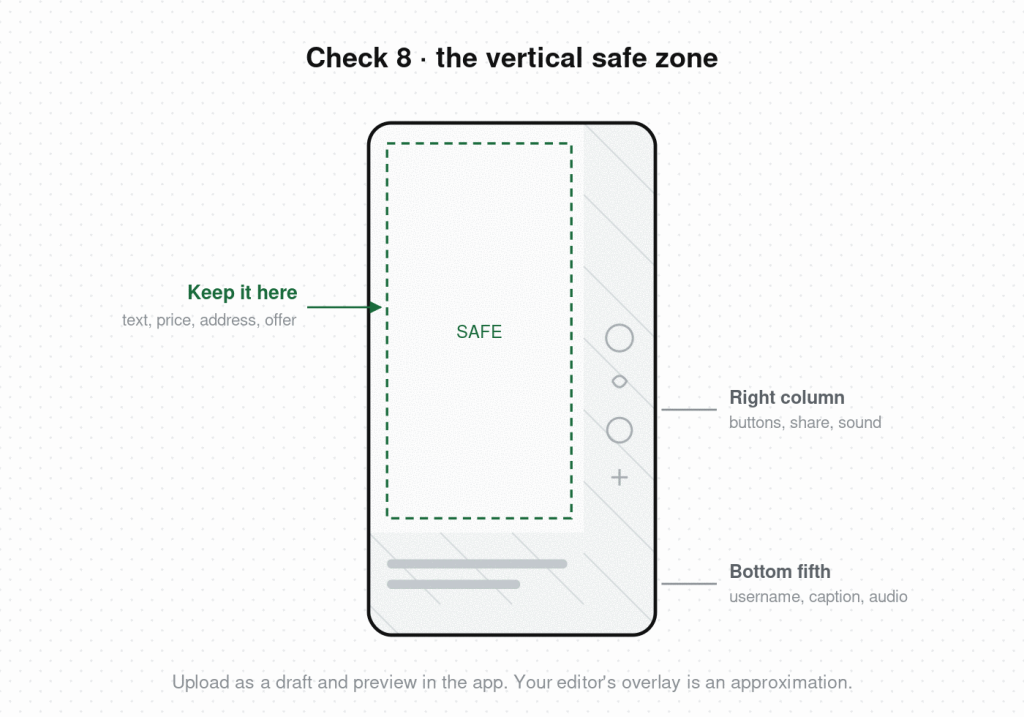
8. Check the vertical safe zone. Platform UI covers roughly the bottom fifth of the frame and a column down the right edge — captions, buttons, username, share icons. Play the video and look for anything important sitting underneath. Local businesses lose the most here, because the address, the price, or the opening hours tend to be the exact thing that ends up behind the share button. The reliable test is to upload as a draft and preview inside the app itself; a safe-zone overlay in your editor is an approximation, the real app is not.
9. Choose the cover frame on purpose. Auto-selected thumbnails come from wherever the platform happens to sample, which is often mid-transition — half a face, a motion blur, a frame between expressions. Scrub to a frame where the subject is legible and something is visibly in progress. A face mid-action outperforms a face at rest, and a frame that raises a question outperforms one that answers it.
10. Read your caption’s first line out loud. Those opening words are the last thing you control before distribution takes over. (If the video has a joke in it, add one more pass first: the half-second timing check for dead frames between the punchline and the cut.) If the line introduces the video — “In this video I’ll show you…” — rewrite it. If it continues the tension the opening frame created, or adds a detail the video withholds, keep it.
The first four checks take about two minutes total and account for most of the outcome. Checks five through seven take longer, and they improve retention on videos that already earned an audience. The last three take under a minute each.
If you only ever run half this list, run the first half. A video with a mediocre middle still gets watched when the opening works. A video with a flawless middle and a dead first frame never gets the chance to prove it.
The list also gets faster. The first few times through, it’s ten separate decisions. After a couple of weeks the first four collapse into a single pass — you’ll mute the opening, glance at the eyes, and know within seconds. What stays manual is the middle section, because judging your own pacing on footage you’ve watched forty times is genuinely hard, and no amount of practice fully fixes it.
What should be on a video editing checklist?
Two categories: technical (resolution, audio levels, captions, export format, safe zone) and retention (does the first frame work on mute, is there tension in the opening, is there a deliberate visual beat in the middle). Most published checklists only cover the first category, and editing software already handles most of it.
How long should a short-form video be?
Long enough to pay off what the opening promised, and no longer. In practice most formats land between 15 and 45 seconds. Completion rate matters more than duration, so a 20-second video watched to the end usually outperforms a 60-second video abandoned at 15.
Do you need captions on every video?
Yes for anything with spoken content. A large share of feed viewing happens with sound off, and captions also improve completion for viewers who do have sound on. Check them for pacing, not just accuracy — auto-generated captions transcribe correctly and break lines badly.
What is the safe zone for vertical video?
Roughly the bottom 20% and the right-hand edge, where platform UI sits — captions, buttons, usernames, and the share column. Keep text and key visual information out of those areas. The exact dimensions differ slightly between TikTok, Reels, and Shorts, so leave margin.
How do you check if a hook works before posting?
Watch the first two seconds on mute, then watch them again at full speed without context. If you can’t state what question the opening raises, viewers won’t find one either. Comparing your opening against videos that held your own attention is the faster method — it turns a vague instinct into a specific structural comparison.
What export settings should I use for TikTok and Reels?
1080×1920, H.264, 30 or 60fps, and let the platform handle compression. Exporting in 4K rarely survives platform re-encoding and mostly costs you upload time. Getting the framing and lighting right in camera affects final quality far more than export resolution does.
Most of this list comes down to one skill: looking at your own footage the way a stranger scrolling past would. That’s hard to do on a video you’ve watched forty times. Hookova breaks a finished cut down second by second — framing, camera, hook technique, and where the opening puts the viewer — so you get an outside read while you can still act on it. For the full range of opening techniques it recognizes, see the video hooks guide.
 Hookova