ou’ve seen it a hundred times this week: the frame slams in on a face, a hand, a receipt, and the beat lands harder than it should. So you tried it, and yours came out soft and slightly embarrassing, like a template someone forgot to turn off.
The move itself takes three keyframes. What the tutorials skip is the part that decides whether it works — what a crash zoom actually says, and the ceiling your footage can take before it falls apart.
Open the clip in CapCut or VN. Find the frame where the thing happens.
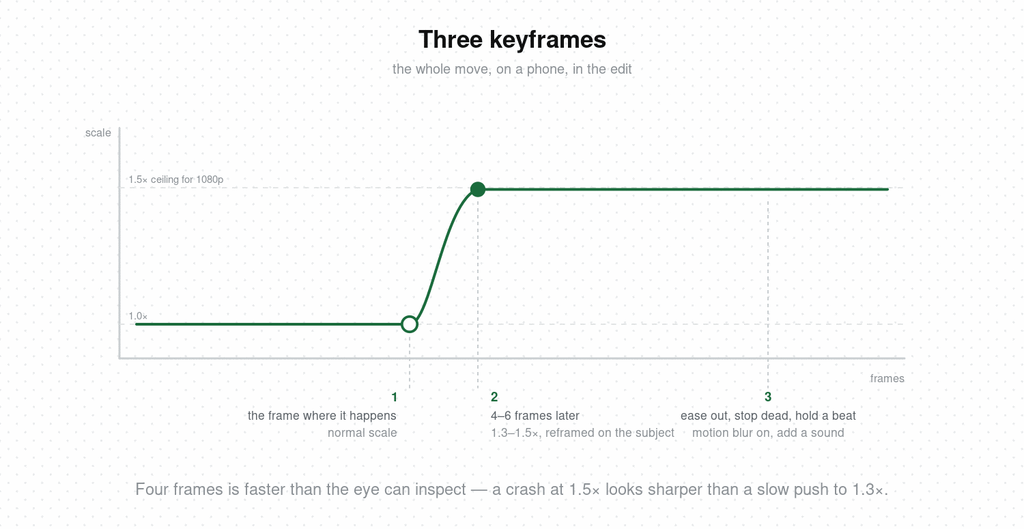
Play it back. If it looks right, you’re done, and the rest of this article is about why it did.
A crash zoom is a sudden, fast push toward a subject — the camera “noticing” something. On a film set it’s done by racking the zoom lens as hard as it goes; on a phone it’s a digital punch-in done in the edit, which is why it’s also called a snap zoom or whip zoom. The speed is the point. A slow push-in says this matters, take your time. A crash says wait — that.
It’s a reaction shot without a face. Nobody on screen reacts, so the camera does, and the viewer’s attention snaps with it. That’s the entire mechanism, and it’s why it lives in comedy: the mockumentary zoom in The Office is the camera operator catching something, and the audience catches it a beat later.
I’ll admit this was a weak spot of mine for years. The fast zoom is one of the hardest camera moves to get clean on a phone, and the reason is mechanical.
Most short video is shot on an iPhone, and pinching to zoom while recording doesn’t zoom a lens — it crops the sensor and hops between the fixed lenses. That’s the stutter and the soft moment you see on every in-camera phone zoom. A genuinely smooth crash zoom in camera needs a lens that physically zooms, which means a dedicated camera. If resolution matters to you, that’s the route.
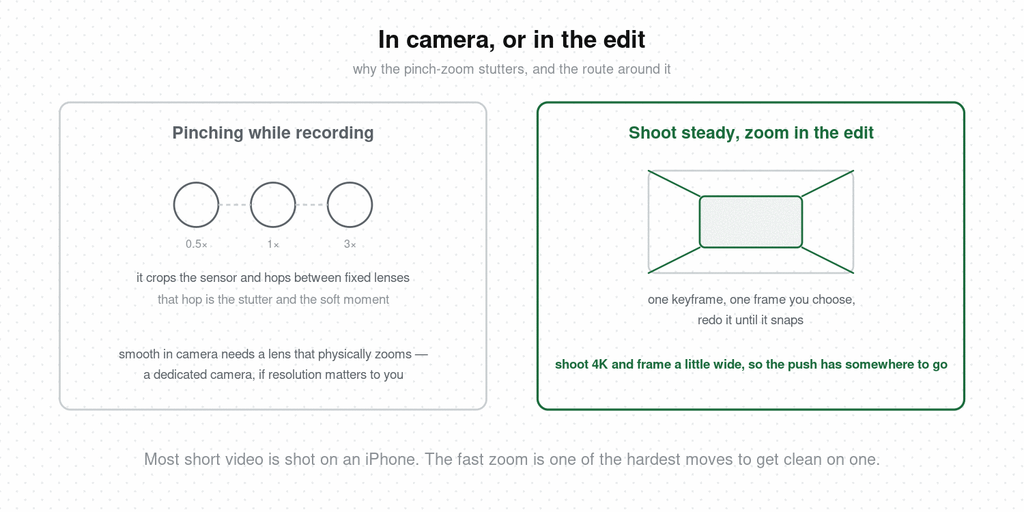
For everyone else: shoot steady, and build the zoom in the edit. You get the same move with a keyframe, it lands on the exact frame you choose, and you can redo it until it snaps.
A digital punch-in enlarges the pixels you already have, so every step of scale is a step of softness.
The working rule: 1.5× is the ceiling for 1080p footage, 2× for 4K. Past that, edges smear and the move reads as a filter. If you know a shot will get the zoom, shoot it at 4K and frame a little wide, so the push has somewhere to go.
Two things hide the softness: motion blur, and speed — four frames is faster than the eye can inspect, which is why a crash at 1.5× looks sharper than a slow push to 1.3×.
Everything about timing here is borrowed from comedic timing, because that’s what a crash zoom is: a beat, delivered by the camera.
Land it on the frame, never before. Start early and you’ve told the viewer where to look before there’s anything to see, which kills the surprise the move exists to create.
Stop dead, then hold. The ease-out matters more than the zoom. A crash that drifts after landing reads as sloppy; one that slams to a halt and holds reads as intentional. Give the frame a full beat of stillness — the viewer needs that room to register what they’ve been shown.
Add a sound. A whoosh, a bass hit, a record scratch, a single note. The ear confirms what the eye just did. Without it, a crash zoom on a phone can feel like an accidental pinch.
Somewhere in your saves is a video whose zoom landed so well you didn’t notice it was a zoom. Hookova shows you the frame it hit: save any TikTok, Reel, or Short in one click, choose it from your library, and it comes back broken down second by second — where the push lands, how far, how long it held.
The crash zoom is punctuation, and it works the same way as a dutch angle or a fisheye close-up: by contrast with everything around it. Use it on every beat and the viewer recalibrates and it becomes texture. Save it for the one moment the video is built around; if you can’t name that moment, no zoom fixes the video.
The move says I just noticed something exists — and that sentence is a hook on its own. Open the video mid-scene, crash onto the thing, and the viewer has been handed a question in the first second without a word of setup.
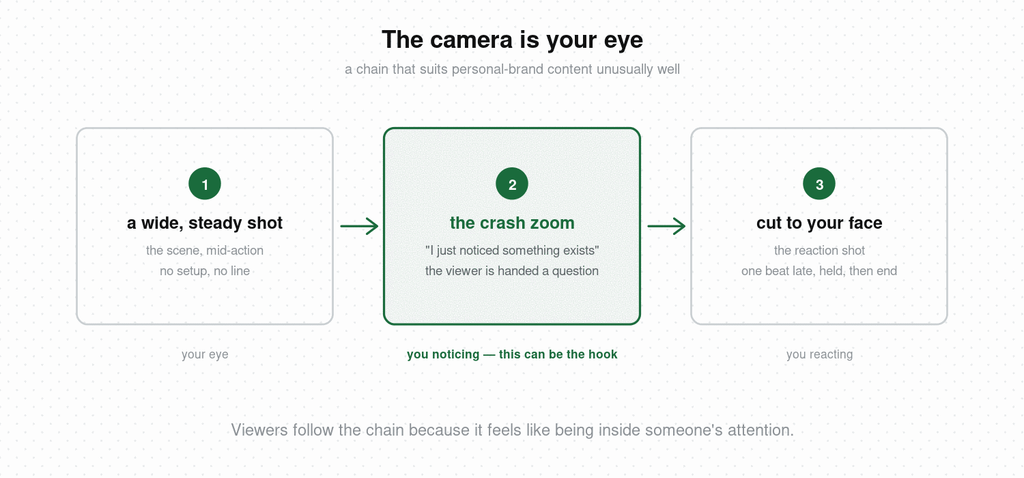
It also chains with the reaction shot into a language that suits personal-brand content unusually well: the camera is your eye, the zoom is you noticing, the cut to your face is you reacting. Viewers follow that chain because it feels like being inside someone’s attention. I’ll leave the monetization logic aside — what it reliably does is pull an audience.
Add one line to your pre-post checks and watch every zoom once for these.
Too slow. Anything over eight frames is a push-in, and a push-in says something different: take your time with this. Tighten the gap between keyframes until it snaps.
Too far. If you can see the pixels at the end of the move, the move is too big for the footage. Pull the second keyframe back toward 1.3× and let the sound carry the rest.
Too early. The zoom started before the moment it’s reacting to. Slide both keyframes later until the push lands on the frame itself.
Skits. Your reaction shot when you’re the only person in frame. Deliver the line, then crash on your own face a beat after the punchline lands — the single-take version of cutting to a deadpan reaction.
Knowledge and education. One push per video, on the line the whole thing is about — the number, the mistake, the thing everyone gets wrong. Keep it small, 1.2–1.3×; in talking-head content a full crash reads as parody.
UGC and product. Crash onto the detail that sells: the stitching, the price tag, the before/after seam. Shoot 4K and frame wide so the zoom delivers the close-up you’d otherwise need a second shot for. Skip the whoosh — on product content it reads as advertising.
Lifestyle and vlog. The zoom is the “wait, look at that” — the dog, the price on the menu, the sign behind you. Handheld footage takes the move better than locked-off, because the wobble reads as a real camera reacting. Vlog frames give that camera something to notice.
What is a crash zoom?
A crash zoom is a very fast zoom toward a subject, done in a few frames, that pulls the viewer’s attention to one point — the camera equivalent of suddenly noticing something. On phones it’s done in the edit as a fast digital punch-in.
What’s the difference between a crash zoom and a snap zoom?
They’re the same move under different names. “Snap zoom” and “whip zoom” describe the same sudden push-in; “crash zoom” is the term most used in film, and it’s become the standard name in short-form editing.
How do you do a crash zoom in CapCut?
Add a keyframe on the frame where the moment happens at normal scale, move forward four to six frames, add a second keyframe scaled to 1.3–1.5× and repositioned on the subject, then set the easing to ease-out and turn on motion blur.
How far can you zoom in without losing quality?
About 1.5× on 1080p footage and 2× on 4K before softness becomes visible. Motion blur and speed both hide pixelation, so a fast crash survives more scale than a slow push-in does.
Do you need a sound effect with a crash zoom?
It helps more than almost any other element. A whoosh, bass hit, or single note confirms the move and stops it reading as an accident. The exception is product content, where sound effects tend to read as advertising.
What is a reverse crash zoom?
The same move run outward — a fast pull-back that reveals context, usually a wider scene the viewer didn’t know was there. It works as a punchline when the reveal changes the meaning of what came before.
The zoom is three keyframes. Knowing which frame deserves it is the actual skill, and the fastest way to learn it is seeing exactly where the videos in your niche put theirs. Hookova breaks any saved Short down second by second so the push, the hold, and the cut after it are there to copy. For the full range of opening techniques it recognizes, see the video hooks guide.
 Hookova