Vertical video on TikTok, Reels, Shorts and Stories is 9:16 at 1080 × 1920. YouTube is 16:9 at 1920 × 1080. Instagram feed posts are 4:5 at 1080 × 1350, and since January 2025 the profile grid shows every post as a 3:4 tile, which trims square and 4:5 images on your profile.
That grid change is why “instagram ratio” gets searched so much now: a square post that looked fine for years suddenly has its edges cut on the profile. The grid is the visible part of the problem. The rest of it shows up once the same video goes to more than one app, because each app lays its own interface over the frame and compresses the file in its own way. That is where my trouble with sizes came from. On Instagram the grid trimmed my covers; on TikTok the like button and the avatar kept landing on the thing I wanted people to look at, and nothing in the editor showed it. And a video cut inside TikTok, downloaded and reposted to Instagram came out visibly worse than either platform alone. Both problems are solved the same way: one export, framed for the overlays, posted to every account from one place. The table has the numbers. Below it, the three things that go wrong.
| Platform and format | Ratio | Pixels | Notes |
|---|---|---|---|
| Instagram feed post, portrait | 4:5 | 1080 × 1350 | Most screen space in the feed; grid trims 6% |
| Instagram feed post, grid-exact | 3:4 | 1080 × 1440 | Matches the profile grid, nothing trimmed |
| Instagram feed post, square | 1:1 | 1080 × 1080 | Grid trims 25% (the sides) |
| Instagram feed post, landscape | 1.91:1 | 1080 × 566 | Allowed; small in the feed and on the grid |
| Instagram Reel | 9:16 | 1080 × 1920 | Grid shows a 3:4 centre of the cover |
| Instagram Story | 9:16 | 1080 × 1920 | Profile strip at the top, reply bar at the bottom |
| TikTok video | 9:16 | 1080 × 1920 | MP4 or MOV; 1:1 is allowed and shown with bars |
| TikTok cover | 9:16 | 1080 × 1920 | Cropped to a 3:4 tile on your profile |
| YouTube Short | 9:16 | 1080 × 1920 | Up to 3 minutes; 1:1 allowed with bars |
| YouTube video | 16:9 | 1920 × 1080 (1080p), 3840 × 2160 (4K), 1280 × 720 (720p) | The player letterboxes anything else |
| YouTube thumbnail | 16:9 | 1280 × 720 | Under 2 MB, JPG, PNG or GIF |
| YouTube banner | 16:9 | 2560 × 1440 | Text inside the 1546 × 423 centre shows on every device |
One export at 1080 × 1920 covers TikTok, Reels, Shorts and Stories. The aspect ratio calculator converts any width or height to any ratio in the table.
The grid used to be square tiles. Since January 2025 it is 3:4, and every post is cropped to a 3:4 centre to fit. A square post loses its left and right edges, a quarter of the image. A 4:5 post loses a thin strip top and bottom. A Reel cover loses a quarter top and bottom. The post itself is untouched; only the tile on your profile is cropped.
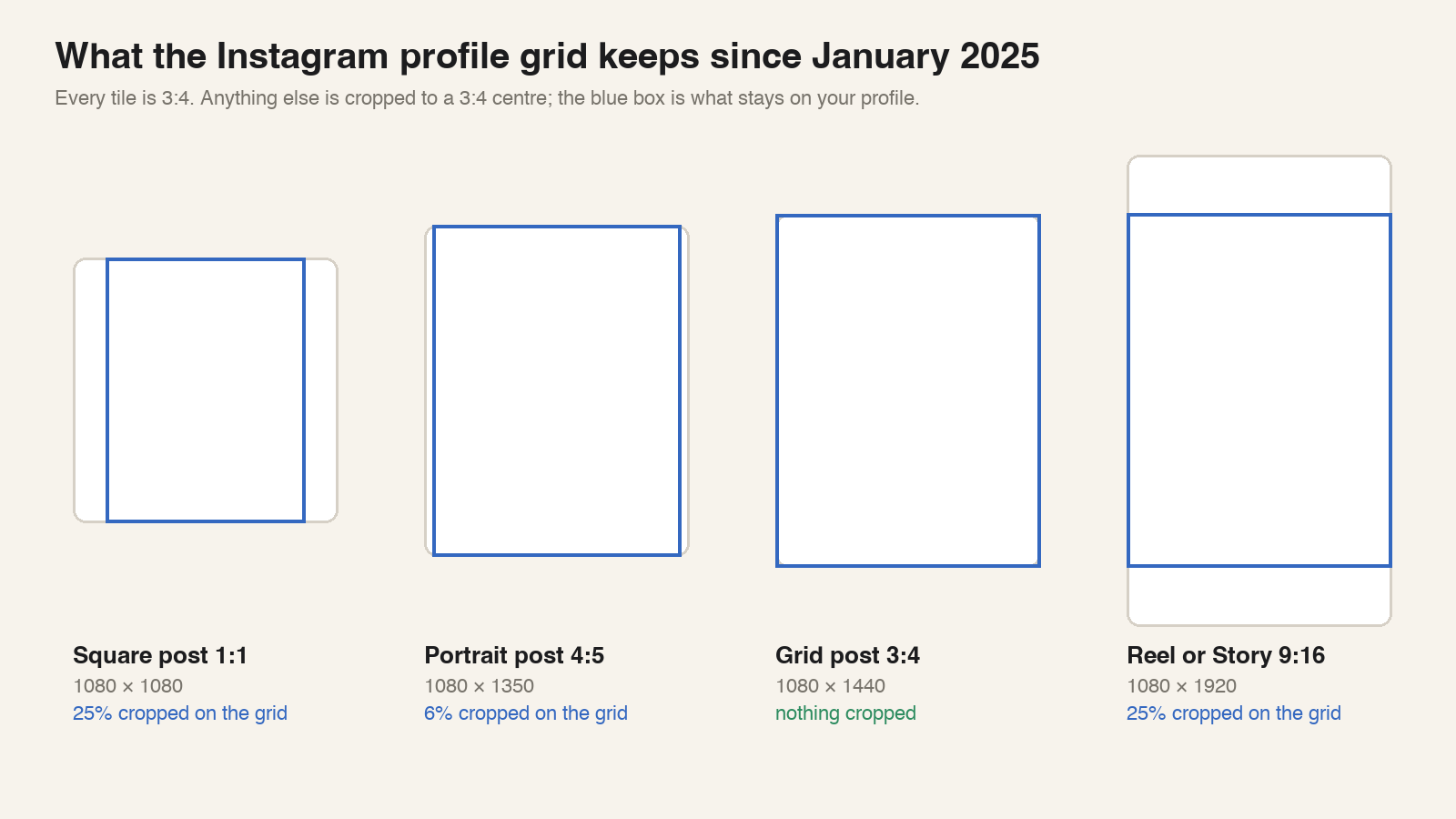
Post 4:5 for the most space in the feed, or 3:4 to match the grid exactly. Stop posting square anything with a face near the edge. The Instagram post size checker draws the grid crop over your image before you post. For a Reel, the crop hits the cover, so pick a cover frame with the subject in the middle 3:4; the Instagram Reel size page shows that crop, and the Instagram scheduler lets you pick the cover frame when you schedule the Reel. Stories have no grid, but the profile strip and the reply bar cover the top and bottom; the Instagram Story size template marks both.
The editor shows a clean frame. The app shows that frame with a caption, a username, a sound title, a column of buttons and a top bar on it. On TikTok about the bottom quarter and the right edge are covered, and the safe area is a little under half the frame. Reels and Shorts cover slightly less in slightly different places. None of the three platforms publishes these numbers; ours were measured in the apps in October 2026 and grow with a longer caption.
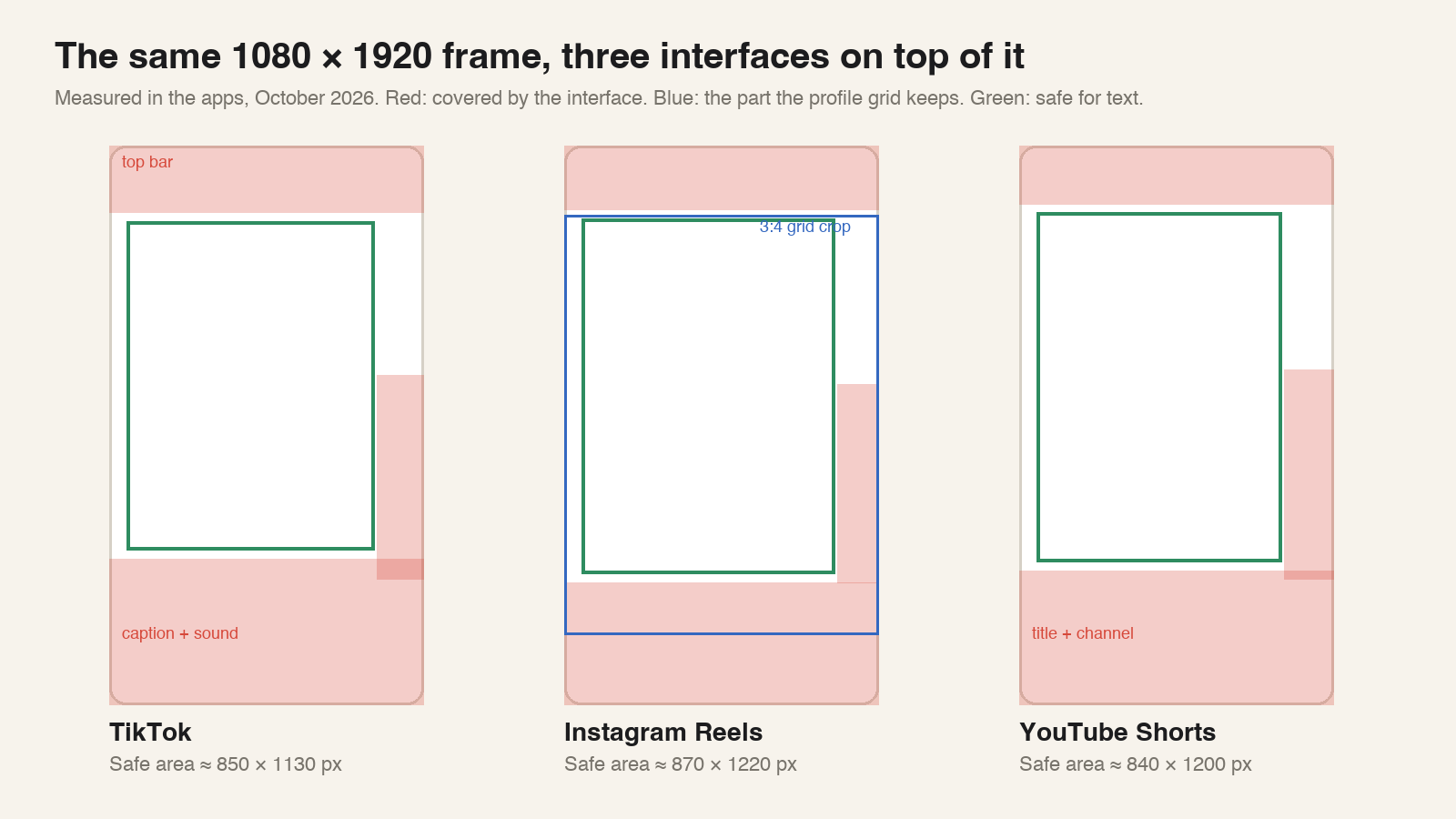
The rule that works on all three: keep text and the subject in the middle of the frame, away from the bottom quarter and the right edge. One export framed that way goes to TikTok, Reels and Shorts unchanged. The TikTok safe zone, Reels safe zone and Shorts safe zone checkers scrub through a finished video with the overlays drawn on, which is how I now catch a caption sitting on a subtitle before posting. The TikTok cover size page does the same for the cover, including the 3:4 crop on TikTok’s profile grid. What to write in the safe area is covered in Text Overlay: What to Write When the Sound Is Off.
Every platform re-encodes an upload. One pass is invisible on a phone. Two passes show.
I cut a video in TikTok’s editor, posted it, and wanted it on Instagram. TikTok’s download button gives you TikTok’s compressed copy, already flatter, with soft edges on text. Instagram compresses that copy again, and the result looks worse than anything either app does on its own. Instagram works the same way, with the download button hidden deeper in the menus.
The fix is to keep the export. Export once at 1080 × 1920 from the editor, and post that file to every platform, so each one compresses the original once. This is one reason Hookova has a scheduler: the file you drop into the composer is uploaded byte for byte and handed to each account you tick, so TikTok, Instagram and YouTube each receive your export with no other platform’s compression on it. A video cut inside TikTok or Instagram needs to be exported from the editor before it is posted, because the post is already the compressed copy.
For long-form YouTube, 1080p is the usual upload and 4K is worth it when the source is 4K. Keep lower-thirds inside the middle 90% of the frame, since televisions still clip the edge; the YouTube video size page draws that area. The YouTube thumbnail size and YouTube banner size pages show where the duration badge and the device cuts land on your images.
A Short is any vertical or square video up to three minutes. YouTube sorts a file into Shorts or regular video by its ratio and length, so a vertical clip sent through the YouTube scheduler lands as a Short with no extra setting; the YouTube Shorts size page checks a frame against the Shorts player. How long to make one is its own question: Shorts Length: What to Aim For, and What Decides It.
A 16:9 clip cropped to 9:16 keeps a third of the frame and looks soft when scaled up. Shoot vertical when the clip is for short-form, or frame wide shots with the middle third in mind when one shoot has to serve both. The storyboard template has a 9:16 frame for planning that before the shoot.
What is left after sizing is repetitive: the same file uploaded to each app, the caption pasted four times, the cover chosen four times. Hookova’s scheduler does it once. Upload the export, tick the accounts, write the caption, pick the cover frame, and post now, take the next slot in your schedule, or set a time. Each account reports back on its own, posted with a link or failed with the reason. The free plan connects one account, Basic ten, Pro fifty.
Are Reels 9:16 or 16:9?
Reels are 9:16, 1080 × 1920 pixels. A 16:9 clip uploaded as a Reel plays with black bars above and below.
What aspect ratio is an Instagram photo?
Instagram accepts feed photos from 1.91:1 landscape to 4:5 portrait, plus 3:4 since the grid changed. 4:5 at 1080 × 1350 is the most common choice; 3:4 at 1080 × 1440 matches the profile grid exactly.
What size is a 1920 × 1080 image?
1920 × 1080 is 16:9, the full-HD or 1080p frame, and the standard size for a YouTube video. Turned on its side, 1080 × 1920 is the 9:16 frame for TikTok, Reels, Shorts and Stories.
Is 4:3 or 16:9 better?
For anything posted today, 16:9 for horizontal video and 9:16 for vertical. 4:3 is the old television ratio; every current player shows it with bars on the sides.
Size decides whether the video is seen whole. The first three seconds decide whether it is watched. Analyze a video to see its opening shot by shot, then schedule it to every account from the same place.
 Hookova